
Fort Crosby | v1.2.2
The Microsoft Flight Simulator 2024 native version of this product can be downloaded here!




Also Available on the MSFS Marketplace for PC & Xbox!
IMPORTANT – LIBRARY REQUIRED!
Emerald Object Library (Also available on Marketplace) is required for this scenery to display as intended! Not installing the library will result in most models not showing throughout the scenery. Emerald Object Library is our own in-house collection of static and dynamic models, materials, and VFX which allows us to push fixes for common assets across multiple products at once, as well as keep the required space of our addons to a minimum by eliminating duplicates in each project.
Welcome to Fort Crosby!
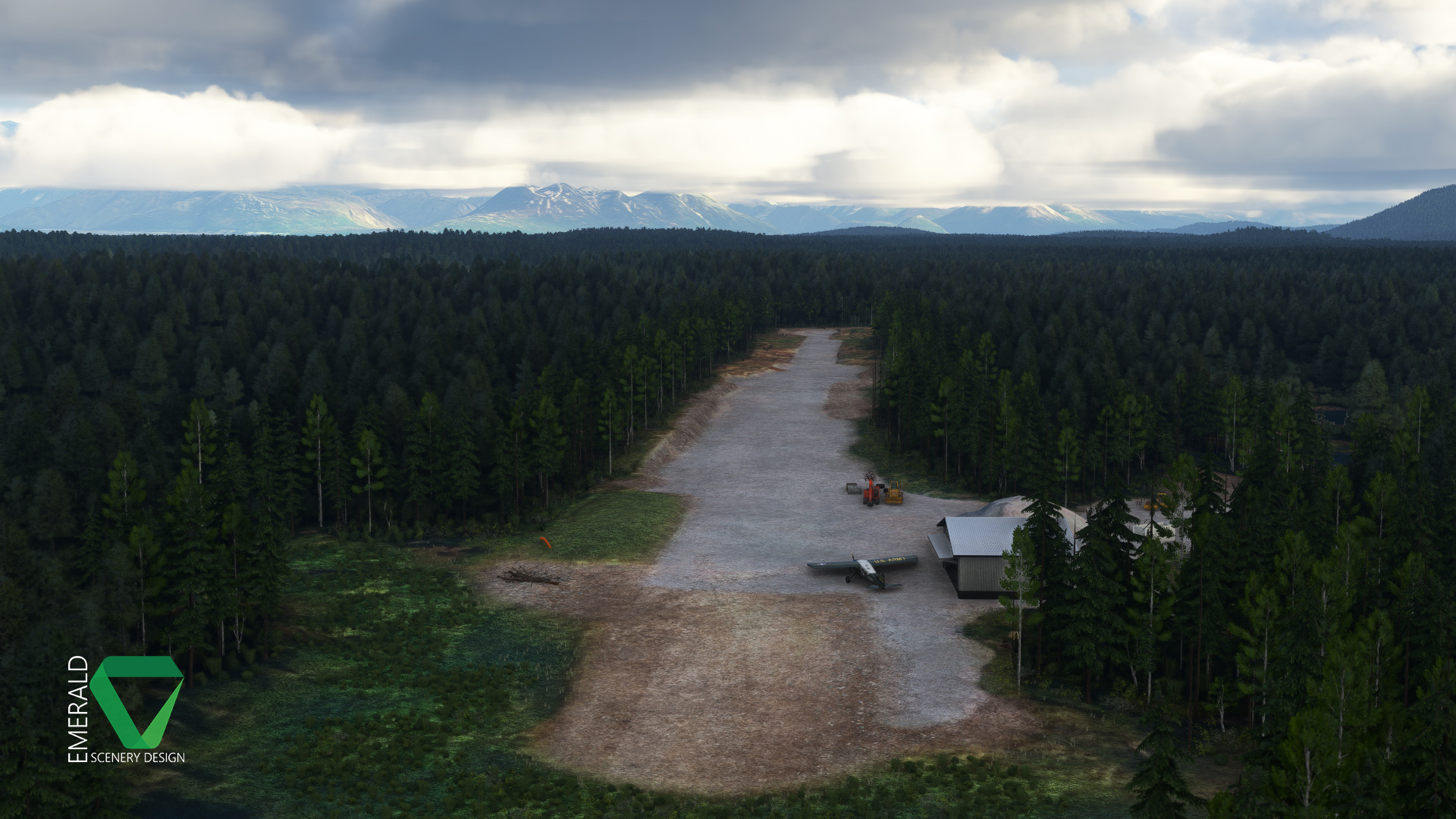
Fort Crosby (8AK5) is a private airstrip located 12.5 nm (23.1 km) to the Northwest of Talkeetna, Alaska. It has a single gravel runway with roughly 1500 ft (457 m) usable, which makes it quite comfortable for most General Aviation aircraft. The only real restriction being on the Northern half of the runway where Dirt and Snow Berms (during the Winter) restrict wingspan and clearance.
Following in the footsteps of our previous releases, Fort Crosby has been brought to life in incredible detail, with a heavy focus on environmentals and dynamic features! It is the perfect companion addon for our nearby Chunilna Cabin Strip payware and Snowflake Lake freeware!
Features
- A coverage area of 4 nm² (7.4 km²), including multiple custom Cabins and Houses with extra details throughout.
- All model textures done in PBR, up to 4K resolution.
- Color-matched aerial imagery at 30cm/px.
- Digital Elevation Model with hand-crafted terraforming at 2m/px, and fully compatible with ORBX’s Alaska Mesh.
- Custom environmentals including Weeds, Wildflowers, Native Shrubs, 3D Trees, Rocks, and Logs.
- Custom Gravel and Dirt ground materials with NRM textures for PBR and added detail.
- Custom Hangar with dynamic features, interior modeling, environmental occluder, and a parking spawn.
- Custom animated wildlife: Bears, Fox, Moose, & Wild Boar roam the coverage area.
- Dynamic SFX using Wwise.
Dynamic Features
- Animated Hangar Door – Opens when your aircraft is parked inside of or just in front of the Hangar.
- Bears – Can be found crossing the runway and roaming the scenery. Will go into hibernation when temperatures fall below freezing.
- Birds SFX (Downy Woodpecker) – Audible throughout the scenery from Dawn to Dusk, but not when Rain or Snow is reported. Randomly switches between call and drumming sounds.
- Birds SFX (Great Horned Owl) – Audible near the Hangar at Night, but not when Rain or Snow is reported.
- Birds SFX (Junco & Fox Sparrow) – Audible throughout the scenery from Dawn to Dusk, but not when Rain or Snow is reported.
- Butterflies – Visible around flowers from May through September. Includes 4 different Alaska native variations! Will not show when Rain or Snow is reported.
- Clock – Located on the back wall of the Hangar. Fully functional based on local sim time and plays ticking SFX (Wwise).
- Improved Lighting – Hangar lighting is functional from Dusk-Dawn and while Raining or Snowing.
- Morel Mushrooms – Pop up around the airstrip from May to July. Commonly found around Rocks and Logs.
- Rain Puddles – Appear when Rain has been reported in the area.
- Roof Snow & Icicles – 3D Snow & Icicles will appear on the Hangar Roof when snow depth has been reported on the ground.
- Snow Berms – Snow Berms will appear around the runway when snow depth has been reported on the ground.
- VFX – Smoke and Campfire VFX will appear throughout the scenery once temperatures fall to 50℉ (10℃) or below.
This scenery requires the following library to function correctly:
Emerald Object Library (MSFS 2020)
Supported Sim(s)
MSFS (2020)
File Format: Zip
File Size
947 MB (Compressed), 978 MB (Uncompressed)
September 2, 2025 | v1.2.2
- Fixed flickering water puddles.
- Fixed Wwise sounds being highly dominant in one ear depending on where the emitter is located in 3D space (hard panning).
March 31, 2025 | v1.2.1
- Adjusted priorities of all terraforming tiles so that they are not likely to conflict with each other.
- Fixed Hangar Roof Snow LOD2 always visible.
- Fixed some streetlights not being excluded throughout the coverage area.
- Hangar Clutter is no longer attached to the Hangar’s interior. All LODs have been reworked and are much more optimized.
- Improved Clock: Reworked final LOD to be lower poly and have cleaner geometry, better matched vertex colors.
- Reverted SimObjects to call needed templates directly instead of common.xml, as it was loading unnecessary templates.
March 26, 2024 | v1.2.0
- Added electrical hum and light switch toggle SFX for hangar lights.
- Added native birds dynamic SFX: Great Horned Owl, Junco, Fox Sparrow, & Downy Woodpecker.
- Adjusted Clock SFX attenuation to not be as abrupt.
- Cleaned up hangar door script.
- Fixed hangar door snapping open/closed when transitioning through the trigger area quickly.
- Fixed incorrect runway headings.
- Fixed outdated Services XML.
- Hangar lights and Snow are now controlled by WorldScript.
- Hangar Snow/Icicles and runway Snow Berms are now tied into the snow depth slider (Live Weather doesn’t detect properly and uses the original temp/precip based code as a fallback).
- Tweaked minSize for some LODs.
- Tweaked position of a few trees that animals were clipping.
February 22, 2024 | v1.1.1 Some files have changed. Please remove the old package to ensure there are no leftovers!
- Added new pathed SimObjects: Boar, Fox, & Moose.
- Fixed vertex color mismatch between last LOD of Hangar door and Hangar exterior.
- Improvements to Hangar: Improved material blending of metal siding and cement detail textures, reduced vert count for last LODs.
- Improvements to Hangar Roof Snow: New snow detail textures (more detail, less texture memory), improvements to shading on LOD1, tweaked LOD2 vertex color.
- Improvements to Wwise SFX: Streamlined Internal/External view SFX, which are now defined in Wwise instead of XML.
November 23, 2023 | v1.1.0
- Fixed a bump along the edge of the runway.
- Fixed some floating vegetation.
- Improved Hangar: Reworked UVs and texture baking, corrugated siding and concrete now uses detail texture for improved quality, reduced overall memory footprint.
- Improved Hangar Clock: Numbers now use a decal for improved quality.
- Improved Hangar Lights: Fixed shading, emissive now uses color channel instead of texture.
- Improved Hangar Snow & Icicles: Reworked LODs.
- Optimized aerial coverage area to slightly reduce CGL size.
- Removed some terraforming rectangles that were no longer needed.
- Reworked Trees and Shrub placement: Now use groups instead of individual placements for improved performance.
October 24, 2023 | v1.0.0
- Initial Release
We try our best to keep a running list of known issues involving sim limitations and 3rd party conflicts when discovered. When possible, fixing these issues are our top priority. However, they may not be immediately solvable due to limitations.
- Hangar Door is closed on Reload
If you reload your flight while inside of the Hangar, the Hangar Door will be closed and can only be opened by slewing outside of the trigger area and back in. [Still investigating – possible limitation] - Little Nav Map
As LNM cannot read encrypted files, Fort Crosby will not show up on it if purchased from the Marketplace! [Limitation – Not likely to be fixed] - Snow Berms Floating on Spawn
Some Snow Berms may be floating on spawn but will snap into (and usually stay in) their correct position when you approach them – this is an issue with how the sim calculates elevation offsets on load. I have been investigating this for over a year now with no known solution. [Sim limitation] - Animals Drop on Spawn
WorldScript animals could spawn in the air and may be seen falling to the ground under certain loading conditions. [Still investigating – possible limitation]
1 review for Fort Crosby | v1.2.2
Only logged in customers who have purchased this product may leave a review.
You can find PDF documentation for this addon at the following link:
View Documentation & EULA


Burstix (verified owner) –
I’ve had many of ESD’s strips, but in preparation for this one, I picked up the Chunilna Lake Bush Strip too! These strips are top notch, Fort Crosby even has snow banks and icicles depending on the weather! Great job ESD!